B&S
Incorrect PIN
✦ Internal Infrastructure Document

How Our Studio
Infrastructure Works

A complete guide to the Bertini & Salas development infrastructure — how Arlo, the VPS, GitHub, and your local machine work together as one seamless system.

01 — Overview

Four Systems, One Brain

Everything in the studio is connected through Arlo — our name for the AI agent, powered by Antigravity (Opus 4.6). Instead of manually SSHing into servers or writing deploy scripts, you describe what you want and Arlo handles it.
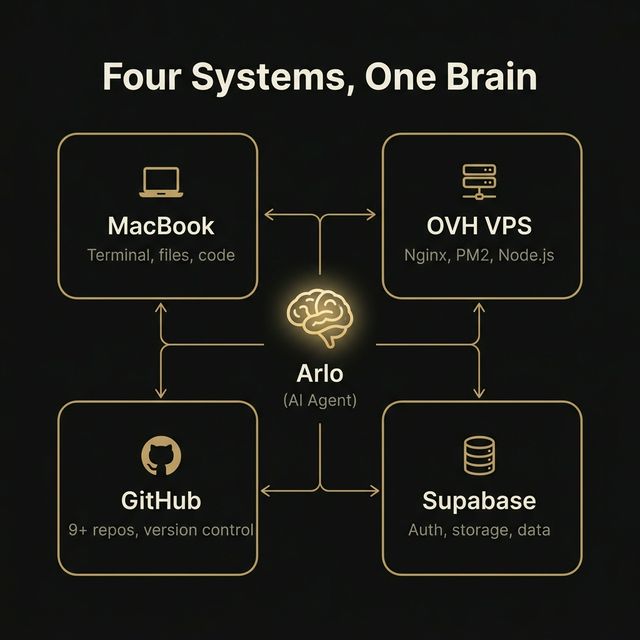
Infrastructure Diagram
🧠
Arlo (Antigravity · Opus 4.6)
The central orchestrator. Terminal control, SSH, Git, Supabase, browser automation — and remembers everything through a persistent knowledge base.
💻
Local Machine
Where code is written and built. All project source code lives here. Backups are pulled to this machine as a safety net.
🖥️
OVH VPS
The live production server. Runs all websites, APIs, status page, Telegram bots, and automated backups. Ubuntu + Nginx + PM2.
🐙
GitHub
Every project is version-controlled. Arlo pushes, pulls, creates branches, and tracks repo freshness. 9+ repos monitored.
Supabase
Cloud database layer for projects needing auth, real-time data, and file storage. Arlo connects directly — queries, creates tables, manages schemas.
02 — Capabilities

What Arlo Does

Arlo isn't a chatbot — it's a full-stack engineer with direct access to your infrastructure.

1

Build & Deploy Websites

Writes code → builds the project → uploads to VPS via rsync → sets permissions → verifies live. No manual server work.

2

Monitor Everything 24/7

A custom status page checks every site, API, SSL cert, database, and PM2 process every 30 seconds. Instant Telegram + push alerts on failure.

3

Version Control & Git

Pushes to GitHub, creates branches, opens PRs, tracks repo activity. Alerts if a repo hasn't been pushed in 24+ hours.

4

Automated Backups

Daily server backups at 03:30 UTC — .env files, Nginx configs, SSL certs, databases, PM2 state. Kept 14 days on server + pulled to MacBook.

5

Server Diagnostics & Repair

Checks disk, memory, zombies, stale SSH. Kills hangs, restarts services, flushes logs, cleans old backups.

02 — Capabilities (continued)

What Arlo Does

6

Client Staging & Gate Pages

Sets up PIN-gated staging environments. Clients get a private preview URL with hidden passcode entry.

7

Generate Documents & PDFs

A full HTML-to-PDF system with multiple branded themes. Client proposals auto-generated via AI with structured pricing, scope, and timelines.

8

Learn & Remember

After every task, Arlo documents what it learned — architecture decisions, deployment gotchas, config patterns. This knowledge persists forever.

9

Email & Notifications

Transactional emails via Resend, forwarding via ImprovMX. Arlo sets up domain DNS, verifies SPF/DKIM, and configures templates per project.

10

SEO & Site Migrations

Pre-launch SEO blocking, go-live switches, full audit checklists. Safe migrations from Wix/Squarespace/WordPress with 301 redirects and canonical preservation.

03 — Deployment

How Code Gets to Production

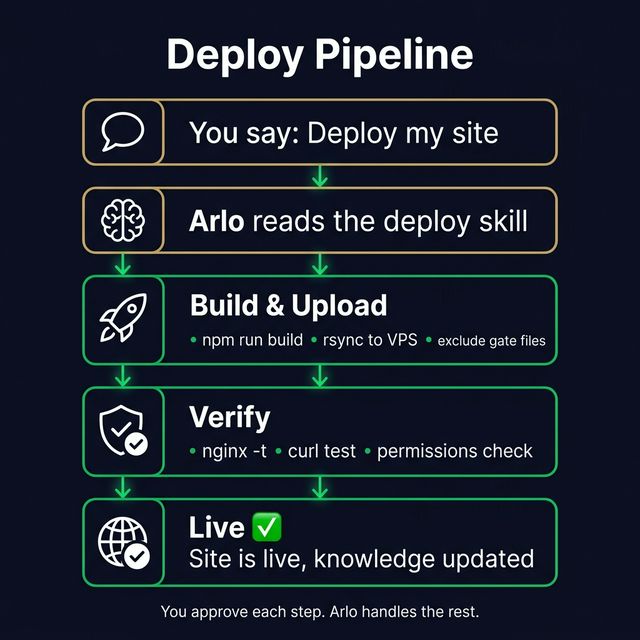
Every deployment follows the same battle-tested pattern. Arlo handles the entire flow.

Deploy Pipeline
StepWhat HappensWhere
1. BuildVite/React/Next.js compiles the projectMacBook
2. Uploadrsync sends files to staging directory on VPSMacBook → VPS
3. SwapOld files removed, new files moved into live directoryVPS
4. PermissionsOwnership set to www-data, permissions to 755VPS
5. RestartPM2 restarts Node.js service (if applicable)VPS
6. VerifyStatus page checked, site loaded, asset hashes updatedVPS + Browser

Safety rule: Gate files are excluded from every deploy via rsync --exclude flags. A deploy can never overwrite a client's staging page.

03 — Deployment (continued)

Live Projects

ProjectURLType
RAAKraakwear.comVite + Node
B&Sbertinisalas.comVite + Node
Wacky Hairwackyhair.bertinisalas.comSubdomain
WH Bookingbooking.bertinisalas.comSubdomain
BagBuddybagbuddy.bertinisalas.comSubdomain
CamMovecammove.bertinisalas.comSubdomain
On-Fireonfire.bertinisalas.comSubdomain
Antwerpantwerp.bertinisalas.comSubdomain
ALNaln.bertinisalas.comSubdomain
Hire-A-Techiehireatechie.bertinisalas.comSubdomain
GSRgsr.bertinisalas.comSubdomain
Rose's Tailorbertinisalas.com/rosestailorStatic
Gathered Findsgatheredfinds.bertinisalas.comSubdomain
LINE Automationbertinisalas.com/line/Node.js
Telegram BotsNode.js
04 — Monitoring

24/7 Health Monitoring

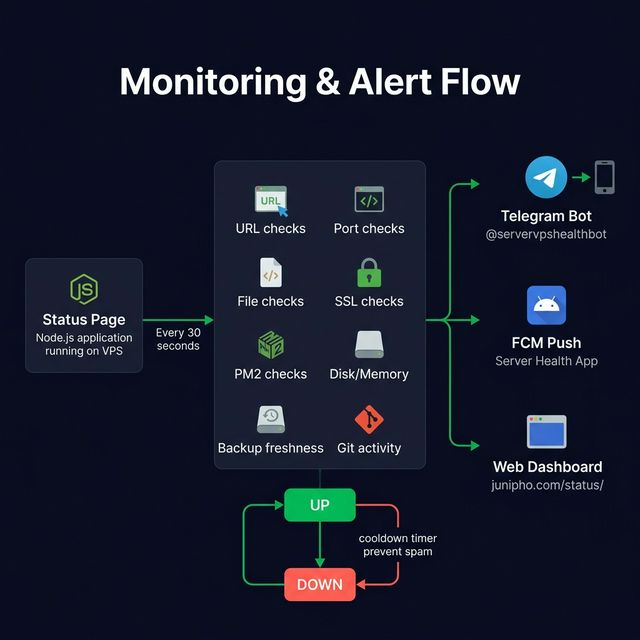
A custom-built status page runs on the VPS and checks every service every 30 seconds. Built entirely in Node.js — tailored to exactly what we need.

Monitoring & Alert Flow
04 — Monitoring (continued)

What Gets Checked

🌐
URL Checks
Every live site pinged for a 200 response.
🔌
Port Checks
TCP connections test Node.js services are listening.
📁
File Checks
Verifies critical files (JS bundles, configs) exist on disk.
🔒
SSL Checks
Monitors certificate expiry across all domains.
⚙️
PM2 Checks
Ensures all Node.js processes are "online".
💾
Disk & Memory
Resource usage tracked with warning thresholds.
📦
Backup Freshness
Alerts if latest backup >28 hours old.
🐙
Git Activity
Monitors GitHub push recency via API.

Alerts via 3 channels: Telegram bot, FCM push notifications to a custom Android app, and a web dashboard. State machine fires only on transitions (up→down, down→up) with cooldowns to prevent spam. Manual backups triggered remotely via Telegram — no laptop needed.

05 — Backups

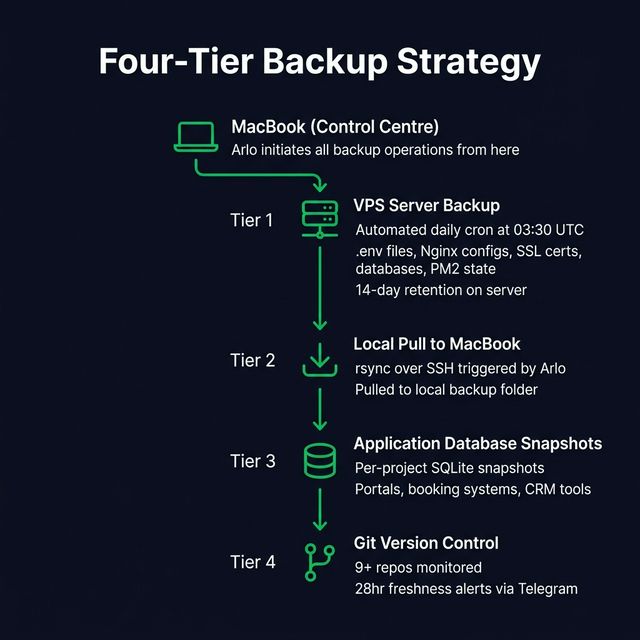
Four-Tier Backup Strategy

Nothing is ever lost. The studio runs a multi-layered backup system that covers server configs, databases, code, and client data.

1

Automated Server Backups

Cron job at 03:30 UTC daily. Captures all .env files, Nginx configs, SSL certs, PM2 state, SQLite databases, and crontabs. 14-day retention on server. Triggerable via Telegram /backup command.

2

Local Pull to MacBook

Arlo pulls all server backups via rsync to ~/backups/vps/. Creates a second copy outside the VPS — protection against total server failure. 7-day local retention.

3

Application Database Backups

Projects with databases (client portals, booking systems, CRM tools) maintain their own separate SQLite snapshot backups of all data. These are captured both by the daily server backup script and through individual project-level snapshots — ensuring database state is never lost even if a deploy goes wrong.

4

Git Repository Tracking

9+ repos monitored via GitHub API. Status page checks "last push" — if a repo hasn't been pushed in 24+ hours, it shows a warning. Ensures code is always version-controlled.

Disaster recovery: Full rebuild procedure documented — provision VPS, upload backup, restore configs, install runtime, pm2 resurrect. Under 1 hour with backups available.

Backup Strategy Flow
06 — Knowledge

The Knowledge System

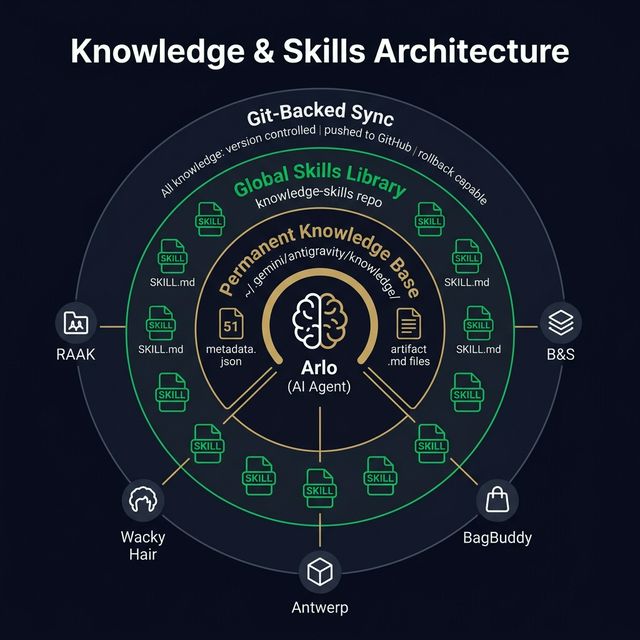
Arlo doesn't forget. Every project, pattern, gotcha, and decision is stored in a structured knowledge base that persists permanently across every conversation and every project.

Knowledge & Skills Architecture
06 — Knowledge (continued)

How It's Structured

knowledge/
├── raak_website/            # Project-specific knowledge
│   ├── metadata.json        # Title, summary, references
│   ├── timestamps.json      # Auto-managed
│   └── artifacts/
│       ├── architecture.md   # Tech stack, structure, key files
│       └── deployment.md    # Build, deploy, VPS paths
├── studio_vps/             # Cross-cutting infrastructure
├── studio_databases/       # All database schemas
├── studio_domains_services/  # Domains, env vars, bots
├── nginx_patterns/         # Reusable Nginx configs
└── ... (51 items total)
metadata.json
Every item has a dense ~500-word summary covering purpose, tech stack, features, deployment, and gotchas. This is what Arlo reads first — the single most important field.
Artifact Documents
Detailed .md files — architecture, deployment, webhooks, admin panels, email templates. Never deleted — new content appended with dated sections.
Custom Rules (GEMINI.md)
A global rules contract that governs how Arlo edits code — full file output, no silent refactors, fail-fast on ambiguity, preservation guarantees. Version-controlled in the knowledge repo.

51 knowledge items covering every project, service, database, and infrastructure pattern in the studio.

07 — Skills

The Skills Library

Knowledge is what Arlo knows. Skills are what Arlo can do. Each skill is a step-by-step procedure with exact commands, safety checks, and troubleshooting tables — shared globally across every project.

SkillWhat It Does
VPS DeployDeploy any static site or Node.js app — build, upload, swap, permissions, verify
VPS SSH & TroubleshootConnect, diagnostics, kill zombies, check disk/memory, restart services
VPS Backup ManagementTrigger, pull, verify, restore backups. Full disaster recovery
Server Health MonitoringBuild or extend the status page — check types, Telegram/FCM alerts
Add Service to MonitoringAdd a new project with URL, port, file, SSL, and Git checks
New Site SetupEnd-to-end: directory, deploy, Nginx, SSL, gate, monitoring, backups
Subdomain SetupDNS, SSL cert, Nginx server block, gate, SEO blocking
Next.js DeployDeploy standalone Next.js apps with PM2 + Nginx proxy
Gate Page SetupCreate PIN, password, or user+pass gates for any project
Client Staging & GatesPIN-gated staging with hidden passcode entry and demo banners
Cross-Service NotifyWire any service to send push notifications via status page API
Stripe Payment SetupStripe PaymentIntents, webhooks, Supabase storage, alerts
Contact Form SetupHTML forms with Resend email delivery + honeypot spam protection
AI IntegrationAdd, configure, and tune Google Gemini AI features
Booking SystemTime slots, payments, reminders, admin CRM
E-Commerce TrackingCustom order tracking — UI, carrier integration, emails
Email SetupTransactional email (Resend) + forwarding (ImprovMX)
PWA SetupManifest, service worker, app icons, install prompt
SEO FinalizationPre-launch blocking, go-live switch, full audit checklist
SEO-Safe MigrationMigrate from Wix/Squarespace/WordPress without losing rankings
Project AuditSystematic 12-domain quality gate audit
Website Audit ReportGenerate branded audit reports using HTML templates
Playbook AuditScan all projects, extract patterns into knowledge + skills
PDF DocumentCreate branded PDF-style HTML documents with gates + encryption
Logo ExportHTML-based multi-size logo export pages for clients
Brand Asset PackComplete brand identity package — logos, colors, fonts, guidelines
Knowledge ManagementRules for creating, extending, and maintaining the knowledge base

Key principle: Skills are never deleted or overwritten. If a process changes, old steps are marked deprecated and new ones added. This preserves full history and prevents accidental loss.

08 — Persistence

How Knowledge Persists & Shares

This is what makes the setup fundamentally different. Arlo's knowledge isn't trapped in chat history — it's structured, permanent, and available everywhere.

1

Layer 1 — Permanent Knowledge Base

60+ structured items at ~/knowledge-skills/knowledge/. This is Arlo's long-term memory. Survives across conversations, restarts, updates. Every project has its own knowledge item. Cross-cutting items (VPS, databases, security, auditing) are shared references. Critical: you must configure GEMINI.md to force knowledge writes to this path — the default path (~/.gemini/antigravity/knowledge/) is ephemeral and gets lost between updates.

2

Layer 2 — Global Skills (Shared Across All Projects)

27 executable skill files in the knowledge-skills Git repo. Available to every project workspace via a custom skills path. Open RAAK or Antwerp — same deployment, backup, monitoring, auditing, and gate skills.

3

Layer 3 — Version-Controlled Backup

The entire knowledge base is synced to a Git repo via rsync. Version-controlled — see what changed, when, roll back if needed. Pushed to GitHub for off-machine backup.

Auto-Documentation TriggerWhat Gets Documented
New project createdmetadata.json + architecture.md + deployment.md + studio_vps + studio_domains_services
New feature addedAppended to architecture.md with dated section
First deployment to VPSCreates deployment.md, updates VPS site table and domain map
Infrastructure changeNginx patterns, PM2 tables, SSL records, bot tables
Repeatable procedureNew skill created or existing skill extended
New database tableSchema added to studio_databases
New environment variableAdded to studio_domains_services

The result: Over time, Arlo builds a living encyclopedia of the entire studio. Nothing forgotten, nothing undocumented. Every pattern reusable. When a new project starts, Arlo already knows how to deploy, monitor, gate, audit, and back it up.

The BRAIN.md manifest: A single file at the root of the knowledge-skills repo that indexes all 60+ knowledge items and 27 skills, grouped by category. Arlo reads this at the start of every conversation — solving the "each day starts again" problem. Without it, the agent has to rediscover what it knows each time. With it, full context is loaded instantly.

⚠️ Artifact preservation: Generated images, logos, and documents are saved to a temporary directory (~/.gemini/antigravity/brain/{id}/) that gets wiped between conversations. Any generated asset — mockups, logos, diagrams, screenshots — must be copied to ~/studio-documents/{client}/ before the conversation ends. Nothing should ever exist only in the ephemeral directory.

The playbook audit: Monthly, scan all projects on the VPS and local machine. Extract every undocumented pattern, feature, and technique into new knowledge items and skills. This is how the brain grows — every project teaches something, and those lessons get captured for every future project. Run the playbook-audit skill to execute this systematically.

09 — Robustness

Why This Setup Is Robust

This isn't robust because we got lucky — it's robust because every layer has been made comprehensive on purpose. Every system has a safety net, every process has a check, and every lesson is permanent.

🔄
End-to-End Coverage
Every project has monitoring, backups, version control, deployment procedures, and knowledge documentation. Nothing is left uncovered — comprehensiveness is the default.
🛡️
Multi-Layer Safety Nets
Code on GitHub + server backups on VPS + local backups on MacBook + knowledge in Git. Lose any one layer and everything is still recoverable.
🔍
Pre-Flight Checks
nginx -t before every config change. node -c before status page restarts. Gate file exclusions on every deploy. Permissions verified after every upload.
📝
Strict Editing Rules
Arlo outputs complete files — never placeholders. Never removes code unless asked. Stops and asks on ambiguity. Every edit is minimal and scoped.
🧠
Permanent Memory
Every bug, gotcha, and lesson is encoded into the knowledge base and skills. The Vite base path bug, the symlink gotcha, the SSH hang — none can happen again.
📱
Always-On Visibility
Status page, Telegram alerts, Android push notifications, web dashboard. Three independent alert channels means you always know the state of every service.

The philosophy: Robustness isn't about reacting to failures — it's about building systems so comprehensive that failures are caught before they matter. Every new project automatically gets the full stack: monitoring, backups, version control, knowledge, and safety checks.

10 — Summary

Everything, All In-House

There are plenty of great ways to host and deploy — Vercel, Netlify, AWS, and others all work well. We chose to build everything on our own VPS with an AI agent at the centre. Here's what that gives us.

15
Skills
51
Knowledge items
16+
Live projects
1

You describe what you want

"Deploy the RAAK site" / "Add monitoring for the new project" / "Back up and pull to my machine"

2

Arlo checks its knowledge & skills

Looks up VPS path, build command, rsync exclusions, Nginx config, monitoring entries — all from persistent memory.

3

Arlo executes with safety checks

Connection timeouts, syntax checks, permission fixes, verification. You approve anything destructive.

4

Arlo documents what it learned

New patterns, gotchas, or infra changes recorded in the knowledge base — never forgets, never repeats mistakes.

Own VPS + AI (ours)Vercel / NetlifyCloud (AWS / GCP)
Setup effortHigh initially, but AI automates itVery low — deploy from GitHigh — many services to configure
Monthly cost~£15 flat, unlimited projectsFree tier, then per-projectPay-per-use, can scale up fast
CustomisationFull control over everythingLimited to platform featuresVery flexible but complex
MonitoringCustom-built, tailoredBuilt-in analyticsCloudWatch / third-party
BackupsCustom scripts, multi-layerManaged by platformSnapshots, S3, managed
Best forStudios running many client projectsSingle products, fast shippingEnterprise scale, microservices
🖥️
Own VPS + AI
Best if you're a studio managing many client projects and want full control over everything — routing, monitoring, backups, staging gates. The AI agent removes the complexity.
Vercel / Netlify
Best if you're shipping a product fast and want zero infrastructure work. Push to Git, it's live. Great for solo devs, startups, and teams who'd rather focus on code than servers.
☁️
AWS / GCP
Best for enterprise-scale apps with millions of users, microservices, or strict compliance needs. Powerful but requires dedicated DevOps knowledge.
🔀
Hybrid
Best of both — use Vercel or Netlify for static frontends and your own server for APIs, databases, bots, and background jobs. A common real-world pattern that works well for growing teams.
10 — Summary (continued)

Common Questions

"What if the server goes down?" — The 4-tier backup strategy means a full rebuild takes under an hour. Provision a new VPS, upload the latest backup, restore configs, done. We also get alerted within 30 seconds via Telegram and push notifications, so we'd know before any client does.

"No CDN — isn't that slow?" — For client staging sites and small-to-medium production sites, a single well-configured VPS with Nginx caching is more than fast enough. If a project ever needs global edge delivery, we can add Cloudflare in front without changing anything else.

"What about auto-scaling?" — We don't need it. Our projects don't get sudden traffic spikes of millions of users. The VPS handles our traffic comfortably. If that ever changes, scaling up the VPS or adding a load balancer is straightforward.

"Why not just use Vercel?" — We could, and it's great for what it does. But we need custom Nginx routing, PIN-gated staging, Telegram bots, custom monitoring, server-side APIs, and full SSH access — things that platforms don't offer. For a multi-project studio, owning the infrastructure gives us flexibility that no platform matches.

Prepared by Arlo — AI Agent

Bertini & Salas Digital Studio

March 23, 2026

bertinisalas.com

11 — Getting Started

How to Replicate This Setup

Want to build the same infrastructure? Here's how — and the key thing is: you don't do most of this manually. You tell the AI agent what you want and it executes. You just approve the steps.

1

Get a VPS & Install Essentials

Sign up for a VPS (we use OVH, starting from ~£4/month). Choose Ubuntu 22.04+. Then ask your AI agent: "Install Node.js, PM2, Nginx, and Certbot on the VPS." It SSHs in and runs every command for you.

2

Set Up SSH Keys

Ask the agent: "Generate SSH keys and set up passwordless login to my VPS." It runs ssh-keygen, copies the public key, and disables password login — all from your Mac terminal.

3

Set Up Antigravity (The AI Agent)

This is the core of everything. We use Antigravity powered by Opus 4.6 — it runs in your IDE and has full access to your terminal, file system, browser, and SSH. No separate installation needed. It runs commands on your Mac, organises your folders, creates projects, SSHs into servers, and connects to Supabase.

4

Ask the Agent to Create Your Knowledge Base

Say: "Create a knowledge-skills Git repo with a knowledge/ folder and .agents/skills/ folder." The agent creates the directories, initialises Git, creates the first metadata.json files, and pushes to GitHub — all locally on your Mac. You never touch the terminal.

⚠️ Critical rule: Add this to your GEMINI.md config — "Always write knowledge items to ~/knowledge-skills/knowledge/, never to ~/.gemini/antigravity/knowledge/". Without this, the agent saves knowledge to its default internal path, which can be wiped on updates. The knowledge-skills repo is Git-backed and permanent.

5

Ask It to Write Your First Skills

Say: "Write a VPS Deploy skill and a Backup skill." The agent creates SKILL.md files with step-by-step procedures. Next time you say "deploy my site," it reads those skills and executes them automatically.

6

Ask It to Set Up Backups

Say: "Set up daily automated backups on the VPS." The agent SSHs in, writes a backup script, schedules it with cron, and creates a skill documenting the process. Tell it to "pull backups to my Mac" and it rsyncs them down.

7

Build a Status Page & Android App

Ask the agent to build a monitoring system. It creates the Node.js status page, sets up Telegram alerts, and can even build an Android companion app for push notifications — so you get alerts on your phone when anything goes down.

8

Let It Organise Everything

The agent manages your local Mac too — it can reorganise project folders, clean up files, rename things, sort assets, and structure your workspace. Just ask: "Tidy up my project files" or "Move all PDFs to the templates folder."

The key insight: You almost never type terminal commands yourself. You describe what you want in plain English, the agent figures out the commands, and you approve them. Over time, it learns your entire infrastructure and can handle almost anything autonomously.

SEO warning: Gate pages do NOT block search engines — bots ignore JavaScript. Every staging subdomain needs robots.txt (Disallow: /), <meta name="robots" content="noindex">, and an Nginx X-Robots-Tag: noindex header. Remove all three only when a site officially goes live.

12 — Live Projects

Live Projects Directory

Every site hosted on the studio VPS — with access type, credentials, and live links.

ProjectURLAccessCredentialStatus
B&S Gate🔗Password•••Production
RAAK🔗Public•••Production
Hire-A-Techie🔗Public•••Production
LINE🔗Public•••Production
Portal🔗Login•••Production
Infra PDF🔗PIN•••Internal
On-Fire🔗PIN•••Staging
GSR🔗PIN•••Staging
Antwerp🔗PIN•••Staging
ALN Carpentry🔗PIN•••Staging
HAT Staging🔗PIN•••Staging
BagBuddy🔗User+Pw•••Staging
CamMove🔗User+Pw•••Staging
Wacky Hair🔗Password•••Staging
WH Booking🔗Login•••Staging
Gathered Finds🔗Password•••Staging
Rose's Tailor🔗Public•••Staging

⚠️ Shared PIN alert: Some staging sites share the same access code. Consider assigning unique PINs per project.

🧠

Summary — Nothing Gets Lost

This document covers the full Bertini & Salas infrastructure — four connected systems, one AI brain, and layers of safety nets that ensure nothing is ever forgotten or lost.

The systems: Local Mac + OVH VPS + GitHub + Supabase — all orchestrated by Arlo with 61 knowledge items and 27 executable skills.

Nothing forgotten: BRAIN.md indexes everything. Arlo reads it at the start of every conversation — no day starts from scratch.

Nothing lost: Knowledge writes go to ~/knowledge-skills/ (persistent, Git-backed). Generated images are saved to ~/studio-documents/ before conversations end. Credentials are encrypted, never plaintext.

Nothing unprotected: 14 sites gated with PINs/passwords. Staging sites blocked from search engines. Weekly infrastructure audits. Automated backups with 14-day retention.

Always improving: Monthly playbook audits extract patterns from every project. What we learn on one project benefits every future project.

"Hey Arlo, deploy my site."

"Hey Arlo, audit the whole VPS."

"Hey Arlo, is everything running?"

The AI reads its knowledge, checks its skills, runs the right commands, verifies everything worked, and documents what it learned. You approve the steps. That's it.

Ready to build yours?

Go to Page 17 for Getting Started. Check the Live Projects Directory on Page 18.

Questions? Just ask. Arlo is always here.