A complete guide to the Bertini & Salas development infrastructure — how Arlo, the VPS, GitHub, and your local machine work together as one seamless system.
Everything in the studio is connected through Arlo — our name for the AI agent, powered by Antigravity (Opus 4.6). Instead of manually SSHing into servers or writing deploy scripts, you describe what you want and Arlo handles it.
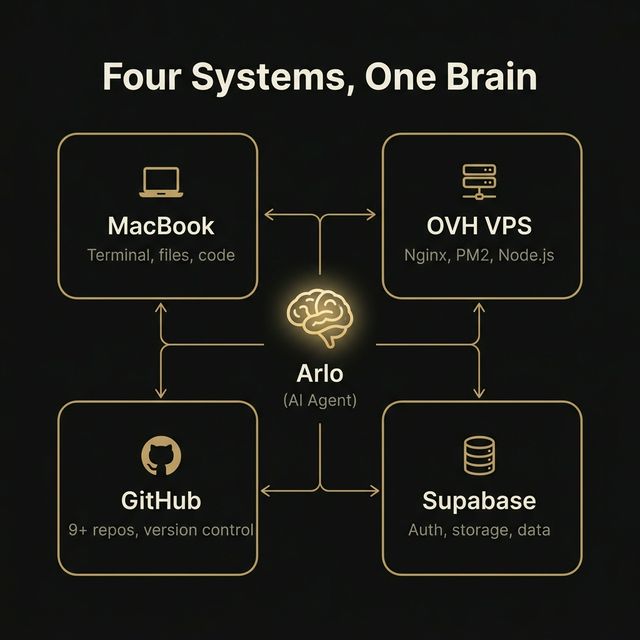
Arlo isn't a chatbot — it's a full-stack engineer with direct access to your infrastructure.
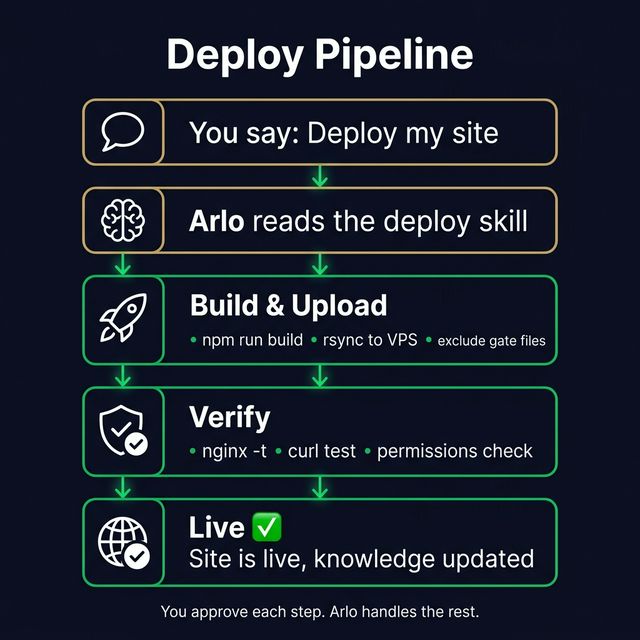
Writes code → builds the project → uploads to VPS via rsync → sets permissions → verifies live. No manual server work.
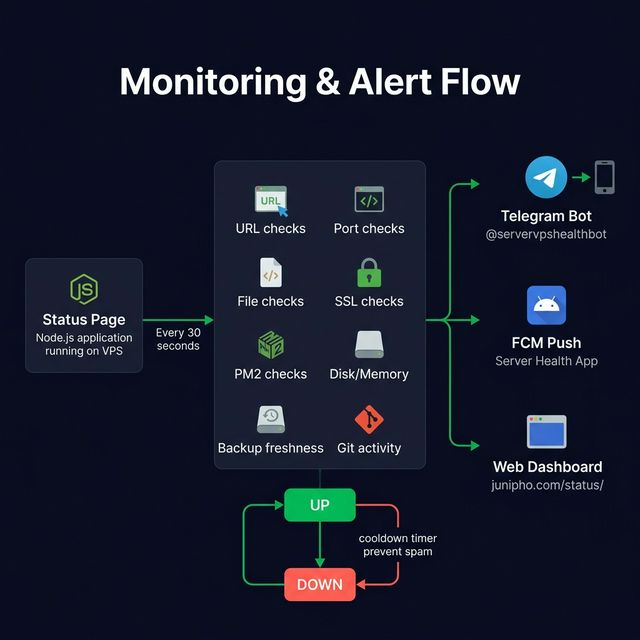
A custom status page checks every site, API, SSL cert, database, and PM2 process every 30 seconds. Instant Telegram + push alerts on failure.
Pushes to GitHub, creates branches, opens PRs, tracks repo activity. Alerts if a repo hasn't been pushed in 24+ hours.
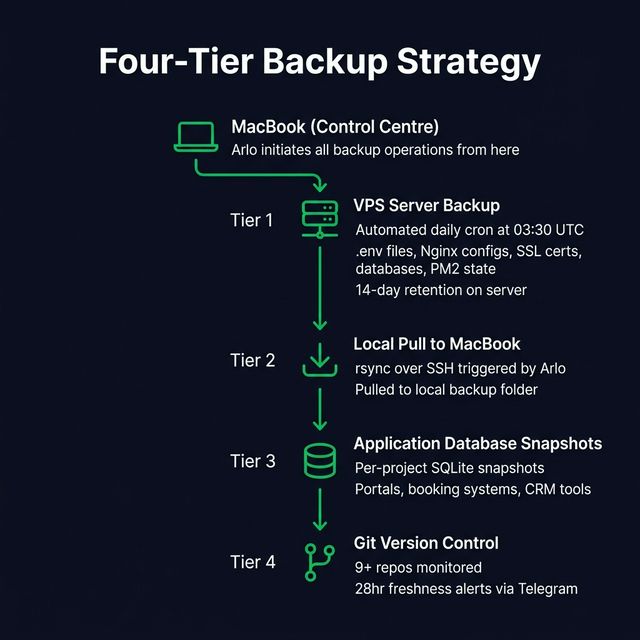
Daily server backups at 03:30 UTC — .env files, Nginx configs, SSL certs, databases, PM2 state. Kept 14 days on server + pulled to MacBook.
Checks disk, memory, zombies, stale SSH. Kills hangs, restarts services, flushes logs, cleans old backups.
Sets up PIN-gated staging environments. Clients get a private preview URL with hidden passcode entry.
A full HTML-to-PDF system with multiple branded themes (B&S dark/gold + LINE green). Client proposals auto-generated via AI with structured pricing, scope, and timelines. Templates stored in a dedicated pdfknowledge library — reusable across all client projects. Print-ready with A4 pagination.
After every task, Arlo documents what it learned — architecture decisions, deployment gotchas, config patterns. This knowledge persists forever.
Transactional emails via Resend, forwarding via ImprovMX. Arlo sets up domain DNS, verifies SPF/DKIM, and configures templates per project.
Pre-launch SEO blocking, go-live switches, full audit checklists. Safe migrations from Wix/Squarespace/WordPress with 301 redirects and canonical preservation.
Every deployment follows the same battle-tested pattern. Arlo handles the entire flow.
| Step | What Happens | Where |
|---|---|---|
| 1. Build | Vite/React/Next.js compiles the project | MacBook |
| 2. Upload | rsync sends files to staging directory on VPS | MacBook → VPS |
| 3. Swap | Old files removed, new files moved into live directory | VPS |
| 4. Permissions | Ownership set to www-data, permissions to 755 | VPS |
| 5. Restart | PM2 restarts Node.js service (if applicable) | VPS |
| 6. Verify | Status page checked, site loaded, asset hashes updated | VPS + Browser |
Safety rule: Gate files are excluded from every deploy via rsync --exclude flags. A deploy can never overwrite a client's staging page.
| Project | URL | VPS Path | Type |
|---|---|---|---|
| RAAK | raakwear.com | /var/www/raakwear/ | Vite + Node |
| Wacky Hair | wackyhair.bertinisalas.com | /var/www/junipho.com/site/ | Subdomain |
| WH Booking | booking.bertinisalas.com | Port 3001 | Subdomain |
| B&S | bertinisalas.com | /var/www/bertinisalas/ | Vite + Node |
| BagBuddy | bagbuddy.bertinisalas.com | /var/www/bagbuddy/site/ | Subdomain |
| CamMove | cammove.bertinisalas.com | /var/www/cammove/ | Subdomain |
| On-Fire | onfire.bertinisalas.com | /var/www/onfire-staging/ | Subdomain |
| Antwerp | antwerp.bertinisalas.com | /var/www/antwerpdentist/ | Subdomain |
| ALN | aln.bertinisalas.com | /var/www/alncarpentry/ | Subdomain |
| Hire-A-Techie | hireatechie.bertinisalas.com | /var/www/hireatechie/ | Subdomain |
| GSR | gsr.bertinisalas.com | /var/www/gsr-staging/ | Subdomain |
| Rose's Tailor | bertinisalas.com/rosestailor | /var/www/bertinisalas/site/rosestailor/ | Static |
| Gathered Finds | gatheredfinds.bertinisalas.com | /var/www/junipho.com/gathered-finds/ | Subdomain |
| LINE Automation | bertinisalas.com/line/ | Port 3000 | Node.js |
| Telegram Bots | — | PM2 services | Node.js |
A custom-built status page runs on the VPS and checks every service every 30 seconds. Zero third-party dependencies — pure Node.js.
Alert channels: Telegram bot (@servervpshealthbot), FCM push notifications to the custom-built Server Health Android app, and the web dashboard at status.junipho.com/status/. State machine only fires on transitions (up→down, down→up) with cooldowns to prevent spam.
Android companion app: A native Android app built in-house that receives real-time push alerts when any service goes down. Also lets you trigger manual backups remotely via the /backup Telegram command — no laptop needed. The app is deployed via direct APK download from the VPS.
Nothing is ever lost. The studio runs a multi-layered backup system that covers server configs, databases, code, and client data.
Cron job at 03:30 UTC daily. Captures all .env files, Nginx configs, SSL certs, PM2 state, SQLite databases, and crontabs. 14-day retention on server. Triggerable via Telegram /backup command.
Arlo pulls all server backups via rsync to ~/backups/vps/. Creates a second copy outside the VPS — protection against total server failure. 7-day local retention.
Projects with databases (client portals, booking systems, CRM tools) maintain their own separate SQLite snapshot backups of all data. These are captured both by the daily server backup script and through individual project-level snapshots — ensuring database state is never lost even if a deploy goes wrong.
9+ repos monitored via GitHub API. Status page checks "last push" — if a repo hasn't been pushed in 24+ hours, it shows a warning. Ensures code is always version-controlled.
Disaster recovery: Full rebuild procedure documented — provision VPS, upload backup, restore configs, install runtime, pm2 resurrect. Under 1 hour with backups available.
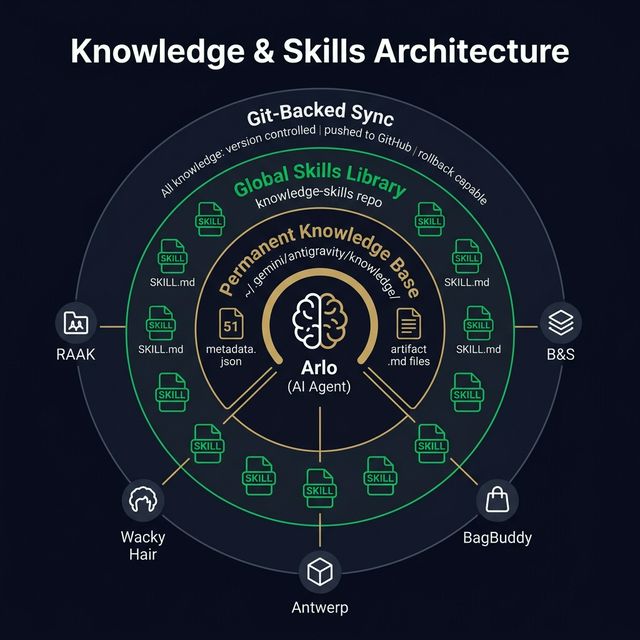
Arlo doesn't forget. Every project, pattern, gotcha, and decision is stored in a structured knowledge base that persists permanently across every conversation and every project.
Knowledge is what Arlo knows. Skills are what Arlo can do. Each skill is a step-by-step procedure with exact commands, safety checks, and troubleshooting tables — shared globally across every project.
| Skill | What It Does |
|---|---|
| VPS Deploy | Deploy any static site or Node.js app — build, upload, swap, permissions, verify |
| VPS SSH & Troubleshoot | Connect, diagnostics, kill zombies, check disk/memory, restart services |
| VPS Backup Management | Trigger, pull, verify, restore backups. Full disaster recovery procedure |
| Server Health Monitoring | Build or extend the status page — check types, Telegram/FCM alerts |
| Add Service to Monitoring | Add a new project with URL, port, file, SSL, and Git checks |
| New Site Setup | End-to-end: directory, deploy, Nginx, SSL, gate, monitoring, backups |
| Client Staging & Gates | PIN-gated staging with hidden passcode entry and demo banners |
| AI Integration | Add, configure, and tune Google Gemini AI features |
| Booking System | Time slots, payments, reminders, admin CRM |
| E-Commerce Tracking | Custom order tracking — UI, carrier integration, emails |
| Email Setup | Transactional email (Resend) + forwarding (ImprovMX) |
| SEO Finalization | Pre-launch blocking, go-live switch, full audit checklist |
| SEO-Safe Migration | Migrate from Wix/Squarespace/WordPress without losing rankings |
| Project Audit | Systematic 12-domain quality gate audit |
| Knowledge Management | Rules for creating, extending, and maintaining the knowledge base |
Key principle: Skills are never deleted or overwritten. If a process changes, old steps are marked deprecated and new ones added. This preserves full history and prevents accidental loss.
This is what makes the setup fundamentally different. Arlo's knowledge isn't trapped in chat history — it's structured, permanent, and available everywhere.
51 structured items at ~/.gemini/antigravity/knowledge/. This is Arlo's long-term memory. Survives across conversations, restarts, updates. Every project has its own knowledge item. Cross-cutting items (VPS, databases, security) are shared references.
15 skill files in the knowledge-skills Git repo. Available to every project workspace via a custom skills path. Open RAAK or Antwerp — same deployment, backup, and monitoring skills.
The entire knowledge base is synced to a Git repo via rsync. Version-controlled — see what changed, when, roll back if needed. Pushed to GitHub for off-machine backup.
| Auto-Documentation Trigger | What Gets Documented |
|---|---|
| New project created | metadata.json + architecture.md + deployment.md + studio_vps + studio_domains_services |
| New feature added | Appended to architecture.md with dated section |
| First deployment to VPS | Creates deployment.md, updates VPS site table and domain map |
| Infrastructure change | Nginx patterns, PM2 tables, SSL records, bot tables |
| Repeatable procedure | New skill created or existing skill extended |
| New database table | Schema added to studio_databases |
| New environment variable | Added to studio_domains_services |
The result: Over time, Arlo builds a living encyclopedia of the entire studio. Nothing forgotten, nothing undocumented. Every pattern reusable. When a new project starts, Arlo already knows how to deploy, monitor, gate, audit, and back it up.
PM2 keeps Node.js processes alive. Nginx routes all traffic. Every service is health-checked.
| Service | Port | Health | Purpose |
|---|---|---|---|
| status-page | 3080 | /api/status | Monitoring dashboard |
| raak-payments | 3002 | /health | Stripe payments for RAAK |
| wackyhair-booking | 3001 | /api/health | Next.js booking system |
| bs-portal | 3457 | / | B&S client portal |
| bs-ai-chat | 3456 | / | AI discovery chatbot |
| vps-monitor | 3003 | / | Legacy Telegram monitor |
| openclaw | 18789 | /health | OpenClaw AI gateway |
⚠️ Critical gotcha: bertinisalas.com in sites-enabled is a regular file, not a symlink. Editing sites-available has NO effect. Always edit sites-enabled directly.
This isn't robust because we got lucky — it's robust because every layer has been made comprehensive on purpose. Every system has a safety net, every process has a check, and every lesson is permanent.
The philosophy: Robustness isn't about reacting to failures — it's about building systems so comprehensive that failures are caught before they matter. Every new project automatically gets the full stack: monitoring, backups, version control, knowledge, and safety checks.
No Vercel. No Netlify. No AWS. No third-party monitoring. No external CI/CD. Everything runs on infrastructure you own and an AI agent you control.
"Deploy the RAAK site" / "Add monitoring for the new project" / "Back up and pull to my machine"
Looks up VPS path, build command, rsync exclusions, Nginx config, monitoring entries — all from persistent memory.
Connection timeouts, syntax checks, permission fixes, verification. You approve anything destructive.
New patterns, gotchas, or infra changes recorded in the knowledge base — never forgets, never repeats mistakes.
Prepared by Arlo — AI Agent
Bertini & Salas Digital Studio
March 23, 2026
Want to build the same infrastructure? Here's how — and the key thing is: you don't do most of this manually. You tell the AI agent what you want and it executes. You just approve the steps.
Sign up for a VPS (we use OVH, ~€6/month). Choose Ubuntu 22.04+. Then ask your AI agent: "Install Node.js, PM2, Nginx, and Certbot on the VPS." It SSHs in and runs every command for you.
Ask the agent: "Generate SSH keys and set up passwordless login to my VPS." It runs ssh-keygen, copies the public key, and disables password login — all from your Mac terminal.
This is the core of everything. We use Antigravity powered by Opus 4.6 — it runs in your IDE and has full access to your terminal, file system, browser, and SSH. No separate installation needed. It runs commands on your Mac, organises your folders, creates projects, SSHs into servers, and connects to Supabase.
Say: "Create a knowledge-skills Git repo with a knowledge/ folder and .agents/skills/ folder." The agent creates the directories, initialises Git, creates the first metadata.json files, and pushes to GitHub — all locally on your Mac. You never touch the terminal.
Say: "Write a VPS Deploy skill and a Backup skill." The agent creates SKILL.md files with step-by-step procedures. Next time you say "deploy my site," it reads those skills and executes them automatically.
Say: "Set up daily automated backups on the VPS." The agent SSHs in, writes a backup script, schedules it with cron, and creates a skill documenting the process. Tell it to "pull backups to my Mac" and it rsyncs them down.
Ask the agent to build a monitoring system. It creates the Node.js status page, sets up Telegram alerts, and can even build an Android companion app for push notifications — so you get alerts on your phone when anything goes down.
The agent manages your local Mac too — it can reorganise project folders, clean up files, rename things, sort assets, and structure your workspace. Just ask: "Tidy up my project files" or "Move all PDFs to the templates folder."
The key insight: You almost never type terminal commands yourself. You describe what you want in plain English, the agent figures out the commands, and you approve them. Over time, it learns your entire infrastructure and can handle almost anything autonomously.
That's the whole point. All of the infrastructure, the backups, the monitoring, the deployments, the knowledge system — it all runs so that you only have to do one thing:
"Hey Arlo, deploy my site."
"Hey Arlo, back everything up."
"Hey Arlo, is everything running?"
The AI reads its knowledge, checks its skills, runs the right commands, verifies everything worked, and documents what it learned. You approve the steps. That's it.
Ready to build yours?
Go back to Page 13 and follow the steps. Ask the AI to do each one.
Questions? Just ask. Arlo is always here.